A little Penny Palette update is out! Release 1.1.1 makes setting up your gigs a little easier—and makes your public booking page easier to find.
Add service tasks whenever you’re ready
Previously, you needed to set up your event before you could start adding service tasks. That made sense technically, but not necessarily in real life.
Sometimes you already know who’s getting makeup and what they’re getting long before you’ve figured out the actual wedding-day timeline.
Now you can add service tasks to a booking even if the event timeline hasn’t been defined yet.
Add the services first. Figure out the schedule later. Penny will work with you either way.
Your public booking page is now in your profile
Your Artist Profile now shows the link to your public booking page, making it much easier to find and share with clients.
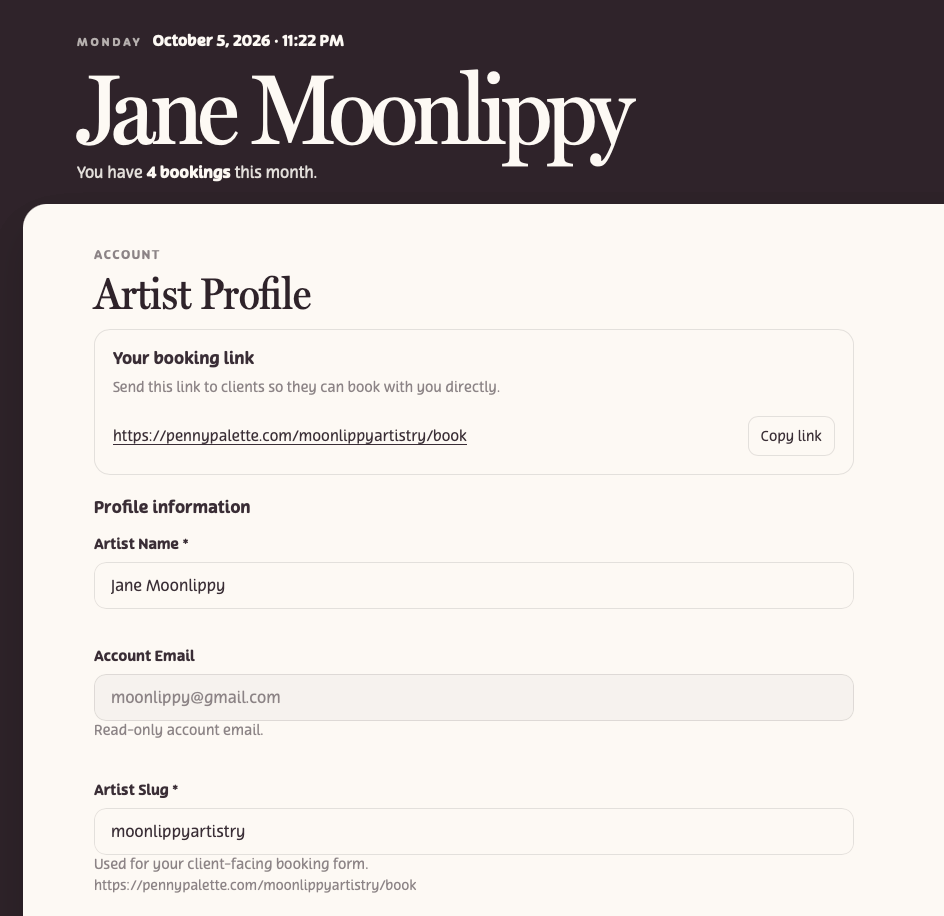
There’s one little thing to know: your booking link uses your Artist Slug.
The Artist Slug is the unique part of your Penny Palette booking URL. Think of it as your Penny Palette username for your public booking page.
For example:
pennypalette.com/moonlippyartistry/book
Because it becomes part of your personal booking link, every Artist Slug has to be unique. Two artists can’t use the same one.
If the slug you want is already being used, you’ll just need to choose another variation.
That’s 1.1.1 ✨
Nothing enormous this time—just a couple of changes that make Penny Palette a little easier to use.
And yes, I mostly wanted to call this one the Lucky Number Release.
If you run into something that feels awkward, confusing, or unnecessarily complicated, send me feedback from inside the app or let me know in the comments. That’s exactly the kind of thing I want to keep smoothing out.
Penny Palette 1.1.1 is live now.


Leave a comment